
Performance Management, Built for the Way You Pay.
No exports. No manual imports. No reconciliation. When performance and compensation share a platform, ratings reach your pay decisions the moment reviews are submitted.
Most organizations run performance in one system and compensation in another. Goals are tracked here. Reviews happen there. Ratings are exported to spreadsheets. Pay decisions are made with incomplete information.
Compose Performance Management gives you a complete performance toolset, goals, check-ins, and reviews, with a built-in advantage no standalone tool can match: it lives on the same platform as your compensation planning, so performance data flows straight into pay decisions.
One System. From Goal-Setting to Pay.
Compose creates a continuous workflow that eliminates the gap between performance management and compensation planning. Every step feeds the next, automatically.
Goals & OKRs
Check-Ins
Performance Reviews
Ratings Write Back
Comp Decisions
Everything You Need to Manage Performance
Compose Performance Management includes a full suite of capabilities, all connected to compensation by design.
OKRs & Goals
Set and align objectives across individuals, teams, and the organization. Choose OKR mode (with key results and cascading alignment) or simplified Goals mode. Either way, progress is visible alongside compensation data.
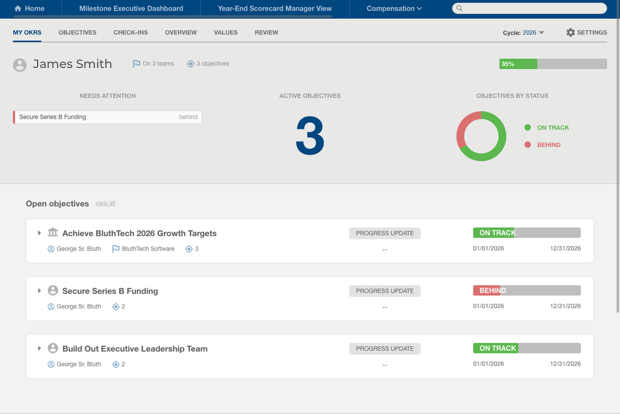
The My OKRs personal dashboard showing individual objective progress, needs attention flags, and the objectives-by-status donut chart.
Structured Check-Ins
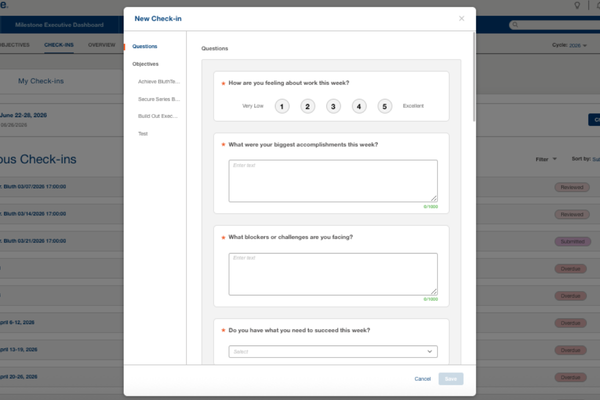
Continuous performance rhythm through automatically generated check-ins on a configurable cadence. Pulse ratings, goal progress updates, and manager responses build the evidence record between formal reviews. Check-in history is carried into the review cycle, so managers don’t start from a blank page.
The employee check-in form showing the pulse rating, active OKR status updates, and manager-configured questions.
Performance Reviews
Configurable review cycles with employee self-assessments and manager evaluations. When a review is submitted, the rating writes directly to the compensation record with no separate import and no delay.
- Configurable review templates with question groups and overall scoring, so reviews can be tailored by team
- Self-assessment and manager evaluation as distinct, configurable workflows
- AI-assisted draft writing to help managers get started
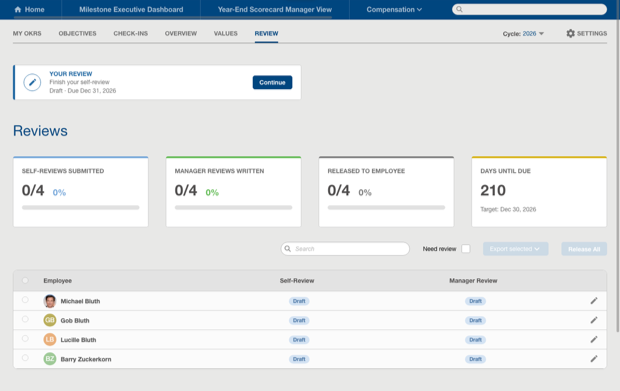
The Review tab showing the active review cycle with employee self-review and manager review status.
Manager & Employee Scorecards
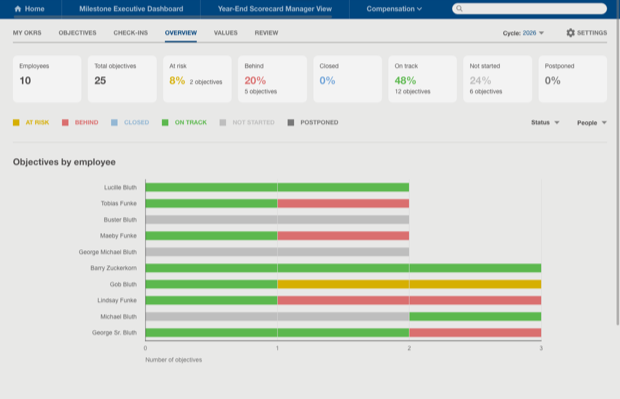
Side-by-side views of performance and pay. Managers see OKR scores, salary, proposed merit increase, and bonus inputs on a single screen. Employee-facing visibility into how performance connects to compensation is available and can be turned on for all employees or limited to specific groups, such as sales, giving organizations full control over what employees see.
The Overview tab showing aggregate objective KPI cards and the Objectives by Employee bar chart with status color-coding.
Company Values
Tag objectives to company values. Turn stated values into measurable data that informs performance conversations and compensation decisions.
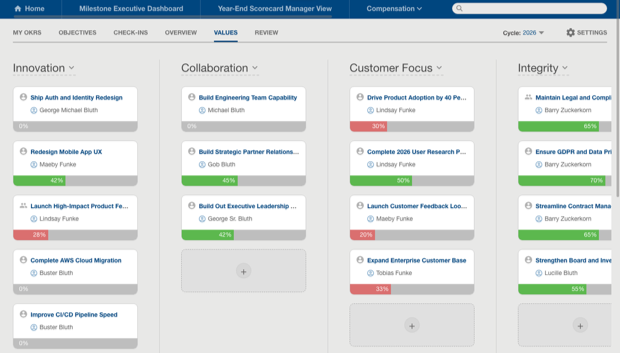
The Company Values view showing objectives organized by value with drag-and-drop alignment capability.
Why Compose?
Native, Not Integrated
Other performance tools connect to compensation through an integration. Compose is different by design: performance data and compensation data live in the same system from the start. There is no API to maintain, no sync to monitor, and no reconciliation when the cycle closes.
One Source of Truth for Pay
Performance ratings and compensation data live on the same platform, so the numbers driving pay decisions are always current and reconciled without exports or version mismatches.
Scorecards That Actually Work
Performance history and pay recommendations live on the same page. No BI tool. No data warehouse. No IT project.
Configures in Weeks
HR admins configure the full performance module through the Compose settings interface.
Download the Brochure!

Subscribe for compensation news, trends, whitepapers, and insights.
Compensation Newsletter
- Clients
- Who we work with
- Resources
- Content
- Videos & Collateral
- News
- Company
- Our Story
- Careers
- Leadership
- Contact Us
© 2026 Decusoft. All rights reserved.